


Yes, in most cases. If your vape has a USB charging port, whether that’s USB-C or Micro-USB, and you pair it with a genuine cable and a standard 5V power adapter, a phone charger will work fine. The condition that matters most is voltage and cable compatibility: skip fast-charging (PD) adapters unless your device’s manual specifically says it supports them.
TL;DR:
- Most vapes with USB ports can safely charge with a genuine 5V phone charger and cable, but avoid fast-charging adapters unless specified by the device manual.
- Devices like disposable rechargeable vapes and pod systems generally support USB charging, while devices with removable batteries should be charged with a dedicated external charger.
- Compatibility depends on port type (USB-C, Micro-USB, Lightning) and physical fit, with forcing a cable into a port risking damage or poor connection.
- Using high-wattage fast chargers risks voltage mismatch, overheating, or battery damage unless the device explicitly supports higher voltages via negotiation protocols.
- Always inspect cables, ports, and charging conditions, avoid overnight charging on soft surfaces, and follow manufacturer guidance to minimize safety risks.
Table of Contents
- Which Vapes Accept USB Charging With a Phone Charger
- Voltage, Amperage, and Why Fast Chargers Are Risky
- Main Safety Risks and How to Avoid Them
- How to Safely Charge Your Vape With a Phone Charger
- Troubleshooting: Signs of Charging Damage
- Publisher Expertise and a Recommended Charger Option
- When Using a Phone Charger Is Actually Fine
- Recommended Charger for USB-C Vapes
- Sources
- FAQ
Which Vapes Accept USB Charging With a Phone Charger
The answer depends entirely on what’s inside your device. Vapes fall into a handful of categories, and only some of them are built to take a phone cable at all.
Disposable rechargeable vapes are the most common candidates. Most newer disposables ship with a small built-in battery and a USB-C port on the bottom or side, meant to be topped off once before the e-liquid runs dry. If you’re shopping for one of these, it’s worth checking our guide to rechargeable disposable vapes to see which models actually include a charging port versus which are single-use only.
Pod systems almost universally charge over USB now. Nearly every pod mod released in the last few years uses USB-C, though a handful of older or budget models still use Micro-USB. Either connector works fine with a phone charger’s cable, provided the cable itself has the right end.
Vape pens with built-in batteries behave the same way. If the battery is sealed inside and there’s a charging port on the device, you’re almost certainly good to go with a compatible cable.
Mods with removable cells are the exception. If your device takes 18650, 21700, or similar removable batteries, it likely has no USB port at all, or if it does, that port charges the device’s circuit board, not the cells directly. Vaporesso’s own charging guidance recommends an external charger for removable cells specifically because dedicated bay chargers distribute current more evenly across each cell and put less strain on internal circuitry than a USB port would. Trying to force a phone cable onto one of these setups either won’t work physically or won’t charge the actual battery you’re trying to charge.
On the connector question, here’s what to look for on the device itself:
- USB-C: The oval, reversible connector found on most modern vapes, phones, and laptops. Widest compatibility with phone chargers.
- Micro-USB: The older trapezoid-shaped connector, still common on budget and older-generation devices.
- Lightning: Rare on vapes, found almost exclusively on some devices designed to pair with iPhone accessories, and it’s the connector you’re least likely to encounter.
Physical fit matters more than people assume. A cable that “sort of” fits but requires force to seat can bend pins or crack a port housing, especially on the smaller, cheaper connectors found on budget disposables. If a cable doesn’t slide in cleanly, don’t push it.
Skip the phone charger entirely if your device has a damaged port (bent pins, a loose-feeling socket), if it’s a sealed non-USB design with no visible charging input, or if it uses removable cells that call for a bay charger instead.
Voltage, Amperage, and Why Fast Chargers Are Risky
Every USB power adapter has its output printed somewhere on the body, usually something like “Output: 5V ⎓ 1A” or “5V/2A.” That label tells you everything you need to know before plugging anything in.
The number that matters most is the first one: voltage. The overwhelming majority of vapes are engineered around a standard 5V input, the same baseline voltage that’s powered basic USB charging for over a decade. Amperage is more flexible. Most devices draw somewhere between 0.5A and 2A depending on battery size, and a charger rated higher than what the device needs isn’t dangerous by itself, because the vape’s internal circuit only pulls what it needs.
The real risk shows up with fast chargers. Technologies like USB Power Delivery (PD) and Qualcomm Quick Charge work by negotiating a higher voltage with the connected device, sometimes 9V, 12V, or more, to speed up charging. Phones and laptops are built to handshake with the charger and request the higher voltage safely. Most vapes are not. According to charging guidance from ELF BAR’s e-cigarette safety blog, variable-output fast chargers should only be used if the device’s charging circuit is explicitly rated for those higher voltages, and a vape that lacks the negotiation handshake or clear PD support can end up exposed to voltage it was never designed to handle.
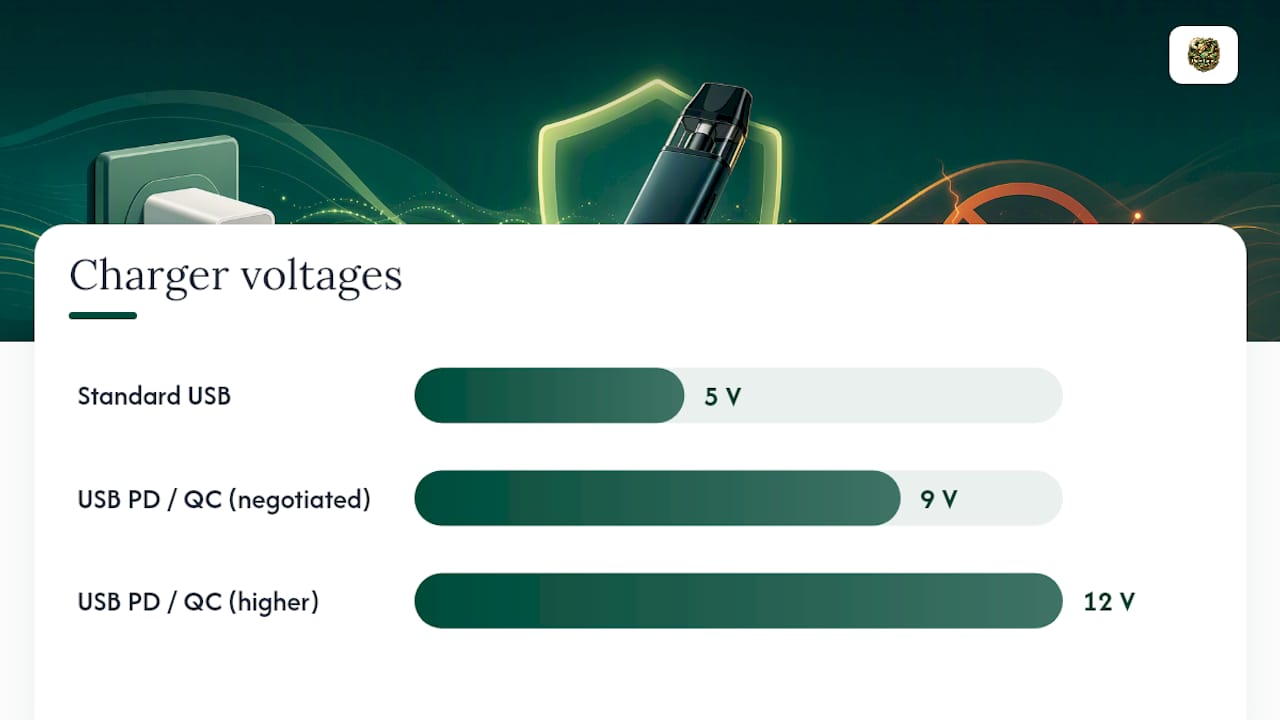
Pro Tip: If you’re not sure whether your wall adapter is a fast charger, check the box or the fine print on the adapter itself. Anything advertising “18W,” “20W,” or “PD” is a signal to find a plain 5V charger instead, or a basic USB-A port on a laptop, which typically outputs a lower, steadier current.
There’s a quieter upside to sticking with lower-current sources too. Charging from something like a computer’s USB port, rather than a high-output wall brick, tends to run cooler because it delivers less current during charging, which is gentler on battery longevity over time.
What to check before you plug in:
- The adapter’s printed output reads 5V as the first number.
- The amperage sits somewhere in the 0.5A to 2A range, not a high-wattage fast-charge spec.
- The cable is rated for charging (not a cheap data-only cable) and shows no fraying, bent pins, or exposed wire.
- Your device’s manual or product page doesn’t explicitly warn against third-party chargers.
A quick numbers check: a standard 5V/1A phone charger delivers roughly 5 watts, which sits comfortably within what most small vape batteries need. An 18W or 20W fast charger delivers three to four times that, which is exactly the gap that causes overheating when a device isn’t built to regulate it.
Main Safety Risks and How to Avoid Them
Using the wrong charger doesn’t usually cause a dramatic failure. It’s slower, quieter damage, until it isn’t.
The realistic hazards fall into a few buckets:
- Overheating. A mismatched voltage or a damaged cable creates resistance, and resistance generates heat. A battery that runs hot every charge cycle degrades faster and, in rare cases, can swell or vent.
- Fire risk. This is low-probability but not zero, especially when a device is left charging unattended on a flammable surface. Safety guidance from a UK schools vaping safety resource specifically warns against charging on soft surfaces like beds or sofas, since they trap heat around the device and raise the odds of overheating turning into something worse.
- Battery swelling. A subtle but telling sign that a cell has been overcharged or exposed to the wrong current repeatedly. Once a battery swells, it should be retired, not charged again.
- Port damage. Forcing an ill-fitting connector, or repeatedly plugging in a cable at a slight angle, wears down the tiny contacts inside a USB-C or Micro-USB port.
- Moisture and contaminant exposure. Vape ports live in pockets and bags alongside lint, dust, and occasional liquid spills. Apple’s own support documentation on liquid and debris detection notes that modern phones can sense contamination and refuse to charge as a protective measure. Vapes generally don’t have that same safeguard, which means a contaminated port on a vape may just charge poorly, spark intermittently, or corrode quietly without ever throwing up a warning.
The materials inside a modern vape, from the lithium battery cells to the aerosol-generating components, are the same category of electronics chemistry researchers have flagged as worth handling carefully precisely because device failure carries real consequences, not just inconvenience.
Practical precautions that actually reduce risk:
- Charge on a hard, flat, non-flammable surface, a countertop or desk, never a bed, couch, or pillow.
- Inspect the cable and port for lint, residue, or moisture before every charge.
- Avoid charging overnight unattended, particularly with a device or cable you’re not fully confident in.
- Don’t charge a device that’s already warm to the touch from use.
- Keep the device somewhere with airflow, not stuffed inside a closed bag or drawer.
One more thing worth knowing before you improvise: manufacturers consistently recommend using the specific cable and adapter that shipped with the device, mainly to guarantee electrical compatibility, but also because using an unapproved third-party charger can void your warranty. If your device is still under coverage and something goes wrong after you’ve been charging it with a random phone brick, that’s a conversation with the manufacturer you’d rather not have to have.
How to Safely Charge Your Vape With a Phone Charger
Here’s the actual sequence to follow, not just the theory behind it.
Before you plug in anything:
- Confirm the port type on your vape (USB-C or Micro-USB) matches the cable end you’re about to use.
- Check the printed output on your phone’s wall adapter. Confirm it reads 5V, and skip anything labeled as a fast charger or PD adapter unless your device’s manual says it’s compatible.
- Look at both the port and the cable tip for lint, moisture, or bent contacts.
During the charge:
- Set the device on a hard, flat surface, away from paper, fabric, or anything flammable.
- Connect the cable and adapter, then check that the charging indicator (light or screen icon) activates normally.
- Touch the device gently after the first 10 to 15 minutes. Warm is normal; hot is not.
- Stay within reach for at least the first charging cycle with a new cable or adapter combination.
- Unplug as soon as the indicator shows a full charge, or immediately if you notice unusual heat, smell, or discoloration.
If something goes wrong mid-charge:
- Unplug the device immediately at the first sign of excessive heat, smoke, or a chemical smell.
- Move it to a hard, open surface away from anything flammable, and don’t handle it more than necessary.
- Do not attempt to charge it again with the same cable or adapter.
- If your device uses removable cells, switch to a proper external bay charger going forward. It’s built for exactly this job in a way a phone cable never was.
Full charges on a small vape battery typically take a duration that varies with battery capacity and adapter amperage. If a charge is running dramatically longer than that on repeat cycles, treat it as a warning sign, not a quirk.
Troubleshooting: Signs of Charging Damage
Some symptoms show up immediately. Others creep in over several charge cycles before you notice something’s off.
Watch for these signs specifically:
- Excessive heat that persists well past the first few minutes of charging, rather than a mild warmth that fades.
- Battery swelling, visible as a bulge in the casing or a battery door that no longer sits flush.
- Odd smells, particularly anything sharp, chemical, or plastic-like coming from the port or seams.
- The device won’t hold a charge, dying within minutes of use despite showing a full charge indicator.
- Slow or unstable charging, where the indicator flickers, resets, or takes far longer than usual.
If your device is showing symptoms of not producing vapor despite appearing to charge normally, that’s often a related but separate issue worth diagnosing on its own; our troubleshooting guide for disposables that light up but produce no vapor walks through the most common causes.
The immediate response to any of these signs is the same regardless of the cause: stop charging right away, isolate the device somewhere safe and ventilated, and swap in a different cable and adapter combination before trying again. If the same symptoms return with a known-good cable and charger, that points to an internal battery or circuit problem rather than a charging accessory issue, and it’s time to contact the manufacturer directly. For anyone running a mod with removable cells, this is also the point to stop relying on a USB port altogether and move to a dedicated external charger built for that specific cell type, or have a qualified repair service take a look.
Publisher Expertise and a Recommended Charger Option
We’ve spent a lot of time helping vapers troubleshoot exactly this kind of issue, from identifying rechargeable disposable models to walking through what to do when a refillable device needs a different charging approach than a sealed disposable. That hands-on familiarity with device categories is exactly why the compatibility rules above matter more than they might seem to at first glance.
A purpose-built vape charger reduces risk in a way a generic phone adapter simply can’t match, because it’s engineered around the exact voltage and current profile a vaping device’s battery circuit expects, rather than negotiating a variable output meant for a phone or laptop. That’s not a small distinction. It’s the difference between a charger that was designed for your device and one that happens to physically fit it.
Before buying any charger, whether it’s a dedicated unit or you’re sticking with a phone charger you already own, check three things on the product listing or manual:
- The output voltage and amperage, confirmed against your device’s own charging spec.
- The connector type, matched exactly to your vape’s port.
- The warranty terms, since some manufacturers only honor coverage when their supplied or approved charging accessories are used.
When Using a Phone Charger Is Actually Fine
Here’s where I’ll push back a little on the alarm-bell tone a lot of vape safety content takes. A phone charger isn’t some reckless workaround. Used correctly, it’s a perfectly reasonable way to charge a compatible vape, and treating every non-branded cable as a hazard misses the more useful point: the risk lives in the mismatch, not the source.
As an emergency solution, a phone charger is genuinely fine, plug in, match the specs, watch the first charge cycle, and move on. Where I’d draw a firmer line is on routine, daily use. If you’re charging the same device every single day, it’s worth owning a charger and cable you know are matched to that device rather than rotating through whatever phone cable is nearest. Worn cables are the quiet failure point nobody checks until something goes wrong, and a fast-charge adapter grabbed off a nightstand is a habit that eventually catches up with a device that was never built to handle it.
— James
Recommended Charger for USB-C Vapes
If your vape charges over USB-C and you’d rather not gamble on whatever adapter happens to be lying around, the Geekvape Type-C Fast Charger with Wall Adapter is built specifically for that job.
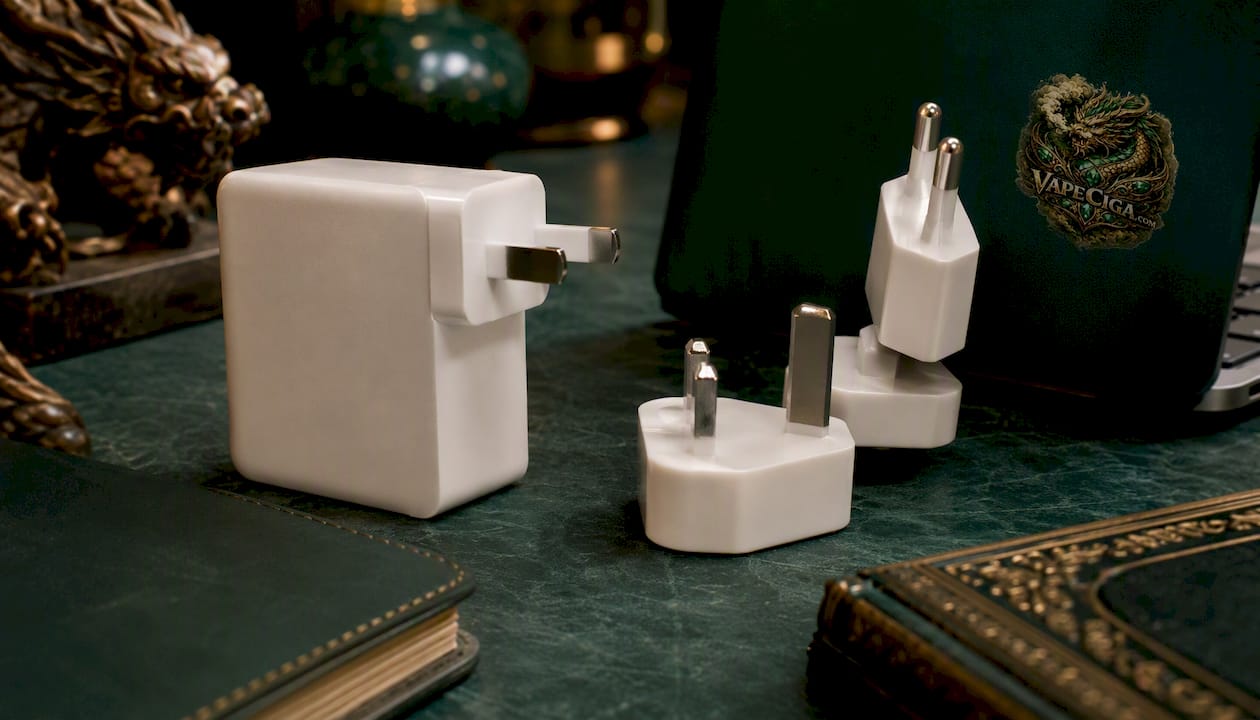
It pairs a USB-C cable with a wall adapter engineered around the voltage and current range vape batteries are actually designed for, rather than negotiating a variable, high-wattage output the way a phone’s fast charger might. That matters because the biggest risk in this whole charging conversation isn’t the cable, it’s a mismatch between what a charger tries to deliver and what your device’s circuit can safely accept. A charger built for vapes closes that gap instead of leaving it to chance.
Before buying, confirm two things on the product page: that your device uses USB-C (not Micro-USB or a removable-cell design), and that the printed output matches what your vape’s manual recommends. Once those line up, you’re looking at a charging setup built for exactly this purpose, not repurposed from a phone accessory drawer.
Sources
A few resources worth bookmarking if you want to go deeper on any piece of this:
- PMC article on e-cigarette aerosol composition
- Apple support: Liquid or debris in the Lightning connector
- How To Charge A Vape: Maximize Battery Life & Safety Tips (Vaporesso)
FAQ
What can I use to charge a vape?
Most vapes with a USB-C or Micro-USB port can be charged with any 5V USB adapter and a compatible cable, including a phone charger, a laptop USB port, or a dedicated vape charger. Devices with removable batteries need an external bay charger instead.
Can I charge my vape with an iPhone charger?
Yes, if your vape uses a USB-C or Micro-USB port and you have the right cable, since the iPhone’s wall adapter typically outputs a standard 5V. Avoid using an iPhone fast-charging adapter unless your vape’s manual confirms it supports higher-voltage input.
Can I use USB-C to recharge a vape?
Yes, USB-C is the most common charging port on modern vapes, pod systems, and rechargeable disposables. Any USB-C cable paired with a 5V adapter, like the Geekvape Type-C Fast Charger, will work as long as the connector fits.
Can you charge a vape with any charger?
Not quite. It needs to match your device’s port type and stay within the voltage your device is rated for, generally 5V, since a fast-charging or PD-enabled charger can expose an incompatible device to higher voltage than its circuit can handle.
Is it bad to charge a vape overnight?
Leaving a vape charging unattended overnight isn’t recommended, since any overheating or cable fault has hours to develop unnoticed. Charge on a hard, flat surface and stay nearby for at least the first cycle with any new charger.